Managing Tasks
Every conversation in AiderDesk lives inside a task. Tasks persist all messages, context files, todos, and costs — close the app, come back tomorrow, and pick up exactly where you left off.
Task Sidebar
The Task Sidebar on the left lists all tasks of a project:
- Sorted by last update, with live status indicators while the agent works
- Search, bulk multiselect, pin, archive, and duplicate actions
- Drag and drop to reorder tasks and subtasks
- Resizable — and collapsible when you need the room
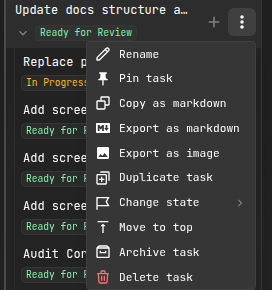
Task Operations
| Operation | How |
|---|---|
| Create | New Task button, or just send a prompt |
| Rename | Double-click the name (or let smart naming generate one) |
| Duplicate | Full copy including messages, context, todos, and cost data — great as a template or for exploring an alternative approach |
| Fork | Start a new task from any past message in a conversation, carrying over the context up to that point |
| Archive | Hide completed work without deleting it |
| Pin | Keep important tasks at the top |
| Export | Save the conversation as Markdown or PNG |
| Delete | With confirmation — deleting a parent deletes its subtasks |
Subtasks
Subtasks break complex work into a hierarchy:
User Authentication
├── Login Form
│   └── Validation Edge Cases
├── Registration Form
└── Password Reset
- Create via the hover action on any task, or let the agent spawn them with its task tools
- Nest arbitrarily deep — subtasks can have their own subtasks
- Each subtask has independent context, todos, and cost tracking
- Subtasks automatically inherit the parent's worktree environment
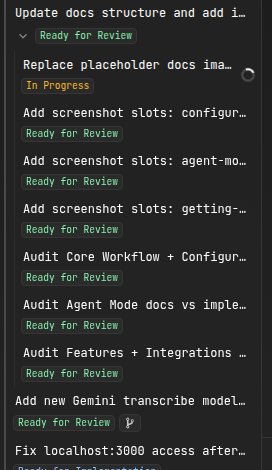
Smart Task States
With Smart Task State enabled (Settings → Tasks), the AI analyzes each task after every prompt and suggests one of three states: More Info Needed, Ready for Implementation, or Ready for Review. Lifecycle states like To Do, In Progress, Interrupted, or Done are tracked automatically as work happens — so you can triage your backlog at a glance.
You can also configure dedicated models for task naming and state analysis in Task settings.
Cost Tracking
Each task independently tracks token usage and costs for both aider and agent interactions, updated in real time. Compare approaches by duplicating a task and running each variant once.
Related
- Git Worktrees — isolate task work on separate branches
- Handoff & Compaction — move focused context into new tasks
- Task Tools — how agents create and manage tasks themselves
- Usage Dashboard — aggregate cost analytics across projects