Handoff & Compaction
Long conversations degrade results: the context window fills up, token costs grow, and the model starts losing track of earlier details. AiderDesk provides three strategies for keeping conversations effective — plus automatic compaction that applies them without you noticing.
Compaction Types
AiderDesk offers three compaction types, configurable globally in task settings and overridable per agent profile:
| Type | What happens | Best for |
|---|---|---|
| Compact | Summarizes the entire thread and replaces the conversation history with the summary | Staying in the same task with a clean context |
| Handoff | Extracts only the context relevant to a stated goal and creates a new focused task | Moving to the next phase with a fresh start |
| Smart | Deterministically trims redundant detail from older messages (stale tool outputs, file reads, searches) without using an LLM | Keeping long agent runs lean without altering or summarizing any content |
Manual Compaction
Run /compact in the prompt field to summarize the current conversation. The generated summary captures:
- The primary request and overall intent
- Key technical concepts and decisions
- A chronological list of user messages
- Files read, created, or modified (with relevant snippets)
- Errors encountered and their resolutions
- Current work and the logical next step
You can guide the summary: /compact Summarize only the code changes.
The original messages are replaced by the summary once generation completes. In Agent Mode a dedicated compact agent profile performs the summarization; in other modes aider's main model is used.
For a non-AI alternative, /smart-compact applies smart compaction to the current conversation on demand.
Pre-compaction Snapshots
Before each compaction (both /compact and /smart-compact, manual or automatic), AiderDesk saves the full pre-compaction context into the task directory:
context.pre-compaction.001.json
context.pre-compaction.002.json
...
Snapshots are numbered sequentially — a higher number means a newer snapshot — and nothing is ever removed from them, so no conversation content is lost to compaction. Agents using the built-in system prompt are informed about available snapshots as absolute paths and can read them whenever they need earlier history that is no longer part of the current context.
Handoff does not create a snapshot: it keeps the original task intact, so its conversation is preserved as-is.
Handoff to a New Task
Run /handoff [focus] to extract what matters for your next goal into a brand-new task:
/handoff implement password reset functionality with email verification
- AiderDesk analyzes the conversation and your focus goal
- It extracts relevant decisions, progress, and patterns — not everything
- A new task is created with all context files transferred and a draft prompt generated
- You review and edit the draft before sending
The original conversation stays intact in the parent task, and worktree mode carries over automatically.
Good focuses are specific and action-oriented: "execute phase one of the created plan", "apply this validation pattern to all API endpoints". Avoid vague ones like "continue" or "finish the project".
Main Task: Build E-commerce Platform
  → /handoff Implement product catalog
  → /handoff Add search functionality
  → /handoff Build shopping cart
Focused threads consistently produce better agent results than one long, meandering conversation.
Automatic Compaction
Instead of watching token counts yourself, configure AiderDesk to compact conversations automatically:
-
Open Settings → Tasks
-
Set when auto-compaction triggers:
- Percentage of the model's context window
- Absolute token count
Whichever threshold is reached first takes effect; set the percentage to
0to disable auto-compaction entirely. -
Choose the compaction type to use (Compact, Handoff, or Smart)
When the threshold is exceeded mid-task, the configured strategy runs automatically and work continues with the condensed context.
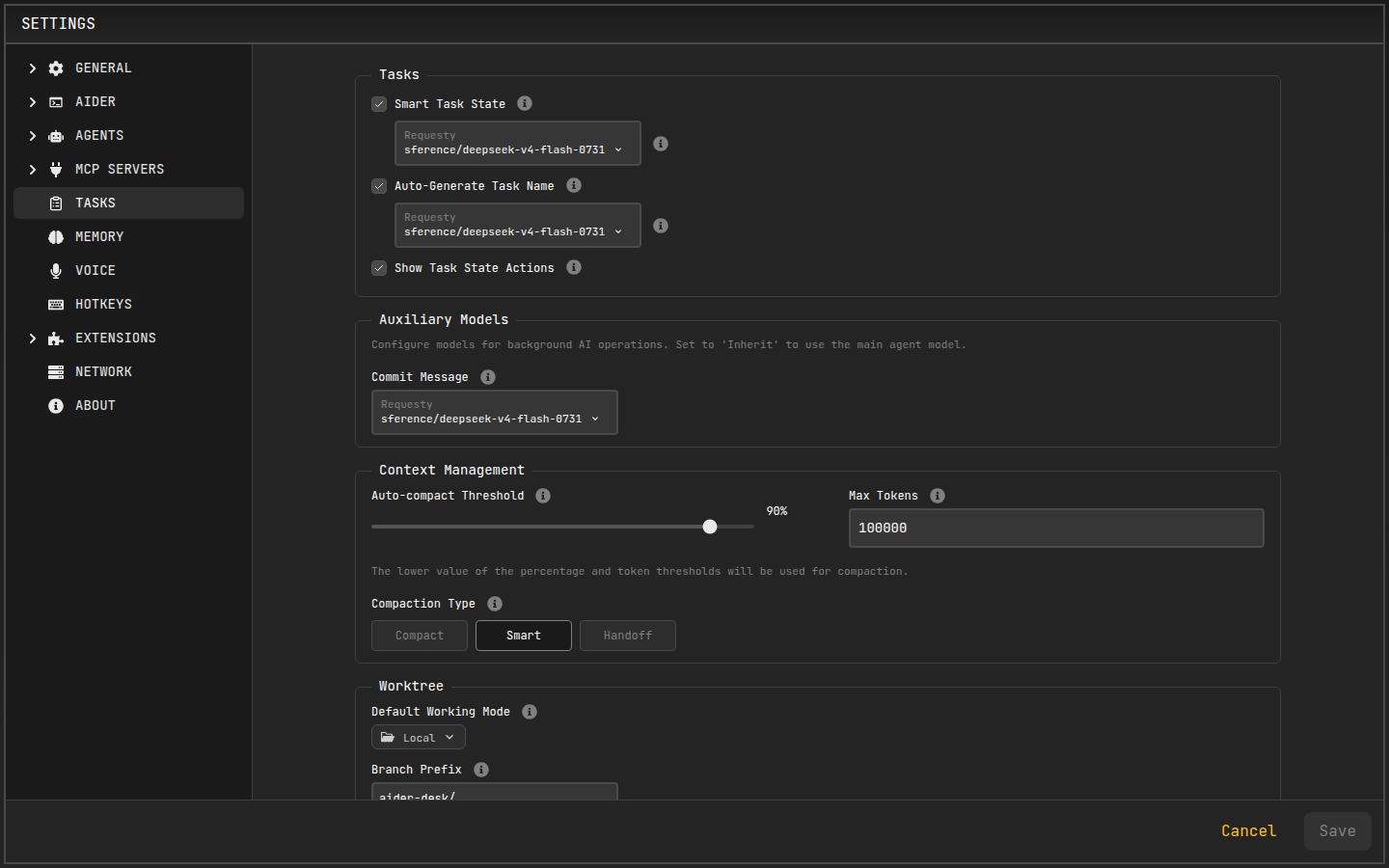
Per-profile overrides are available in Agent Profiles — useful when a subagent should always use Smart compaction while interactive tasks stay manual.
Which One Should I Use?
- Same task, running out of window →
/compact - Next phase deserves a clean slate →
/handoff focus - Don't want to think about it → enable Smart auto-compaction
Related
- Managing Tasks — tasks created by handoff
- Custom Prompts — customize the
handoff.hbstemplate