Skills
Skills let you extend the agent with reusable, on-demand expertise. A skill is a folder that contains instructions (and optionally scripts and reference materials) that the agent can load when it’s relevant.
Unlike pasting huge guides into the chat, skills follow a progressive disclosure pattern:
- On startup, the agent only preloads each skill’s metadata (name + description), which is token-efficient.
- When a task matches, the agent can load the skill by reading its
SKILL.md(and any referenced files) from disk.
What Skills are good for
Skills work especially well for:
- Repeatable workflows you want the agent to follow consistently (e.g., “how we do releases”, “how we write PR descriptions”, “our brand guidelines”).
- Domain-specific playbooks that don’t belong in the model’s general knowledge (internal processes, project conventions).
- Tasks that benefit from executable helpers: skills can include scripts that the agent can run for deterministic, repeatable steps.
- Reducing context bloat: instead of loading everything up-front, the agent only loads the skill contents when needed.
Simon Willison has a good overview of why this pattern is powerful and how it compares to heavier integrations: https://simonwillison.net/2025/Oct/16/claude-skills/
For deeper technical context and best practices, see Anthropic’s engineering article: https://www.anthropic.com/engineering/equipping-agents-for-the-real-world-with-agent-skills
Where Skills live
AiderDesk loads skills from two locations:
- Home-level skills:
~/.aider-desk/skills/ - Project-level skills:
.aider-desk/skills/(in your project root)
This lets you keep personal skills globally, while sharing project-specific skills with your repository.
Skill structure
Each skill is a directory, typically shaped like:
{skills-root}/
  {skill-name}/
    SKILL.md
    references/
    scripts/
    ...
At minimum, a skill needs SKILL.md. It should start with YAML frontmatter containing at least a name and description.
Important prerequisites
Skills only work when Skills Tools are enabled for the active agent profile.
You can enable them in either place:
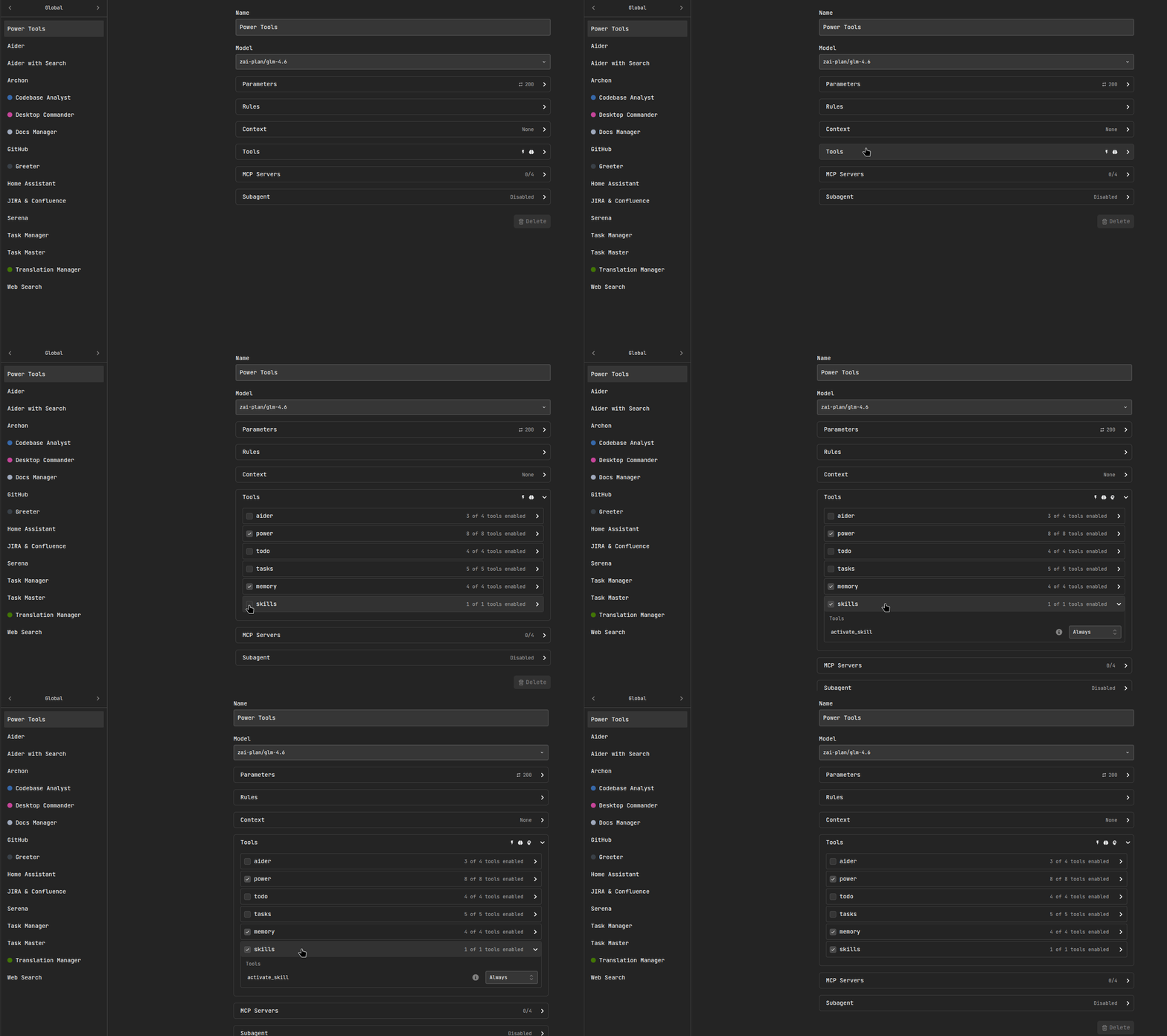
- Agent Settings:
Settings → Agent → (select your profile) → Use Skills Tools - Per-task via AgentSelector:
AgentSelector → Use skills tools
If skills exist on disk but Skills Tools are disabled, the agent won’t be able to discover or load them.
Using Skills in Agent Mode
Enable “Use Skills Tools” in Agent Settings
In Settings → Agent, enable Use Skills Tools for the agent profile you will use.
Enable “Use skills tools” in AgentSelector
You can also toggle skills tools per-task from the Agent selector.
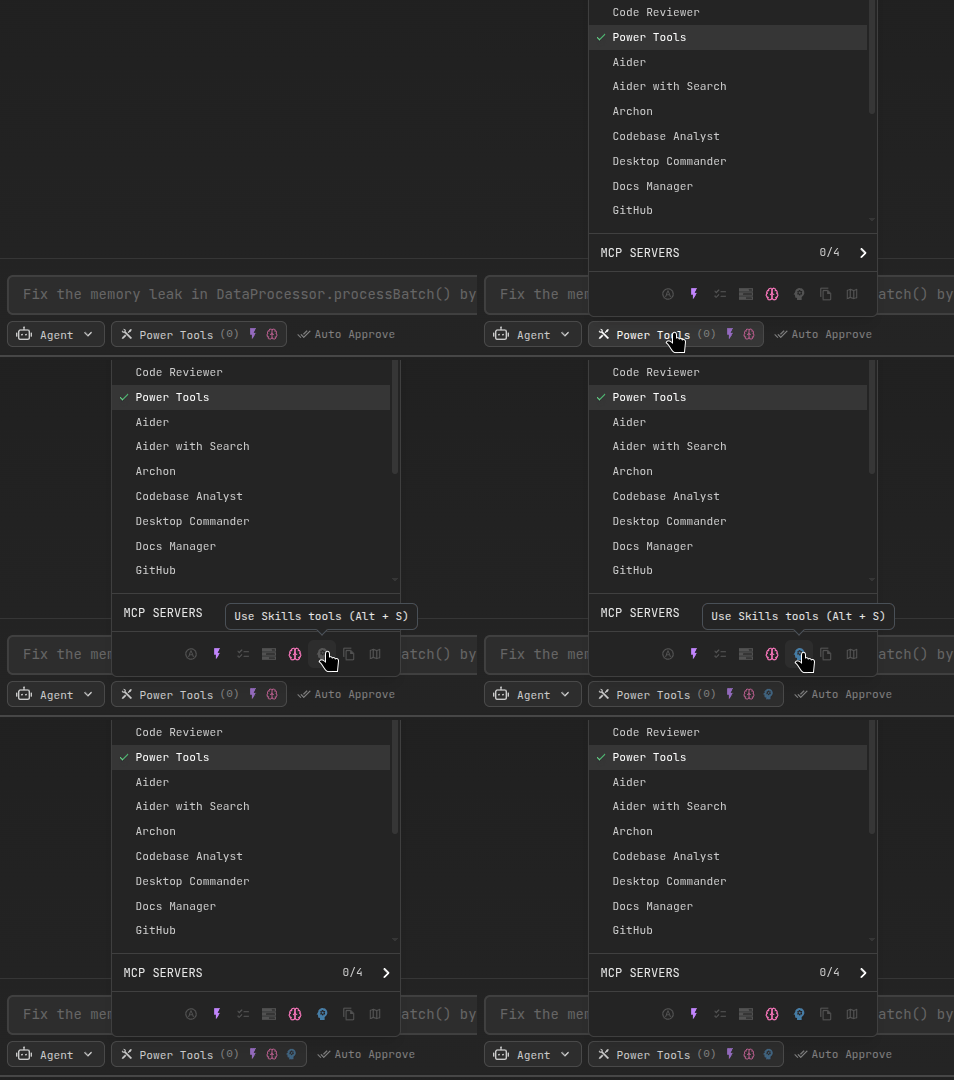
Skills Tools
When enabled, the agent can:
- Discover installed skills (using skill metadata).
- Activate a skill when it’s relevant by loading its
SKILL.mdand following its instructions.
In practice this means the agent can selectively load the right “mini-manual” for the job, instead of relying on generic behavior.
Recommended workflow
- If you use skills frequently, keep their descriptions specific and action-oriented so the agent can select them correctly.
- Prefer small, composable skills over one giant document.
- Move rarely-needed details into additional files referenced from
SKILL.md.
Security notes
Skills can include executable scripts and external links. Treat them like code:
- Install skills only from trusted sources.
- If you didn’t write a skill, audit it before using it (especially scripts and any network access).
- For shared repos, prefer keeping skills project-scoped so they travel with the codebase and are reviewable.
Further reading
- Simon Willison: Claude Skills are awesome, maybe a bigger deal than MCP — https://simonwillison.net/2025/Oct/16/claude-skills/
- Anthropic Engineering: Equipping agents for the real world with Agent Skills — https://www.anthropic.com/engineering/equipping-agents-for-the-real-world-with-agent-skills